
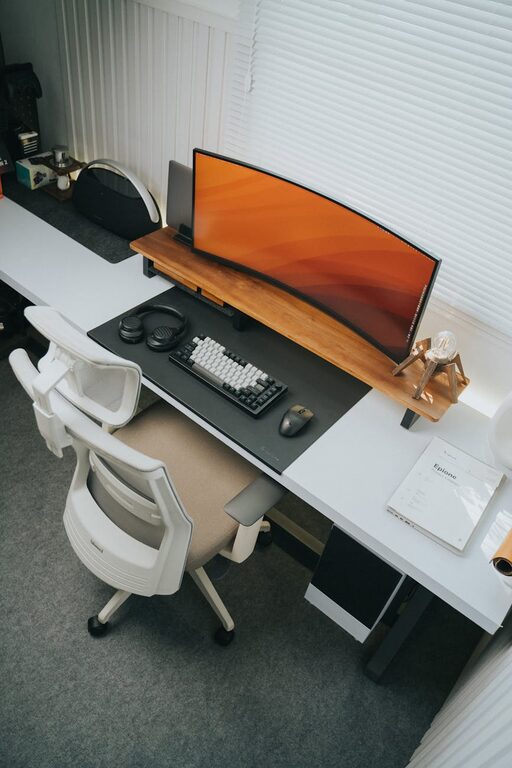
Tips for Organising a Productive Home Workspace
Working from home has become increasingly common, and having a well-organised workspace can make all the difference in staying productive and comfortable. Whether you have a dedicated room or just a small corner, setting up a functional home office helps reduce distractions and keeps your mind focused on the tasks at hand. Below, you’ll find practical tips to organise your home workspace efficiently.
Choose the Right Location
Selecting an appropriate spot for your home workspace is the first step. Ideally, it should be:
– Quiet and Low-Traffic: Find a space away from busy household areas to minimise interruptions.
– Well-Lit: Natural daylight is fantastic for mood and alertness. If this isn’t possible, invest in good-quality lighting.
– Comfortable: Consider temperature, ventilation, and noise levels to ensure you can concentrate without discomfort.
Even a nook in your living room or bedroom can work if organised properly.
Declutter Your Space
A cluttered desk can lead to a cluttered mind. Keeping your workspace tidy supports clear thinking and efficiency.
– Remove unnecessary items from your desk.
– Use trays, baskets, or drawer organisers to store stationery and documents.
– Sort papers regularly; file important documents and recycle what you no longer need.
– Keep only essentials within arm’s reach.
Try the “five-minute tidy” rule: spend five minutes at the end of each workday organising your space for the next day.
Invest in Ergonomic Furniture
Spending long hours at your desk calls for furniture that supports good posture and comfort.
– Choose a chair with adjustable height, lumbar support, and comfortable padding.
– A desk at the right height helps prevent strain on your arms and back.
– Consider a sit-stand desk or a desk converter to vary your posture throughout the day.
Proper ergonomics reduce fatigue and help maintain focus.
Optimise Your Technology Setup
Efficient technology organisation can streamline your work and reduce frustrations.
– Position your computer screen at eye level to prevent neck strain.
– Use cable organisers or clips to keep cords tidy.
– Keep frequently used devices, like printers or external drives, within easy reach.
– Label cables and chargers if you have several devices.
Backing up important files regularly also helps avoid stressful data loss.
Utilise Storage Solutions
Good storage keeps your workspace organised and your tools accessible.
– Use shelving units or cabinets to store books, files, and equipment.
– Drawer organisers keep small items like pens, clips, and sticky notes orderly.
– Vertical storage options save space and keep frequently used materials visible.
– Label shelves and boxes so you can quickly find what you need.
Avoid overcrowding your workspace by regularly reviewing what you store.
Personalise Your Workspace Thoughtfully
Adding personal touches can make your workspace inviting and motivating, but avoid overdoing it.
– Use plants to add life and improve air quality.
– Display a few photos or artwork that inspire you.
– Choose accessories in calming colours or your favourite shades.
Striking a balance between personalisation and professionalism helps maintain focus while making the space enjoyable.
Establish a Routine and Boundaries
Organisation isn’t just physical; time management is key too.
– Set regular working hours and stick to them.
– Use calendars, planners, or digital tools to schedule tasks and breaks.
– Communicate your work hours clearly to family members or housemates.
– Take short breaks to stretch and rest your eyes.
A consistent routine helps your mind associate the space with work, improving productivity.
Keep Supplies Handy
Having all the materials you need within reach saves time and prevents disruption.
– Keep an inventory of office supplies like paper, pens, and chargers.
– Store backup supplies so you don’t have to interrupt your work to find them.
– Place a small trash bin nearby to dispose of waste promptly.
Regularly restock to avoid last-minute searches or interruptions.
Maintain Cleanliness and Air Quality
A clean and fresh environment supports concentration and well-being.
– Wipe down surfaces regularly to keep dust and germs at bay.
– Clean keyboards, mice, and screens often.
– Open windows or use air purifiers to maintain fresh air.
– Avoid eating at your desk to prevent crumbs and spills.
Cleanliness also gives your workspace a neat and professional appearance.
Final Thoughts
Organising a productive home workspace takes some planning and regular upkeep, but the benefits are well worth it. By choosing the right location, decluttering, investing in ergonomic furniture, and managing your time and supplies carefully, you create an environment where you can focus and work comfortably. Remember that your workspace should reflect your needs and preferences, so feel free to adjust these tips as you find what works best for you.
With these strategies in place, tackling work from home can become a more enjoyable and efficient experience.